

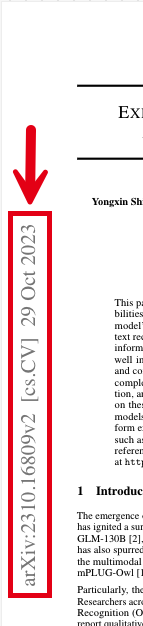
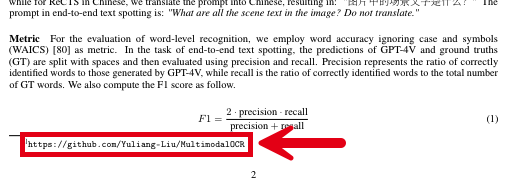
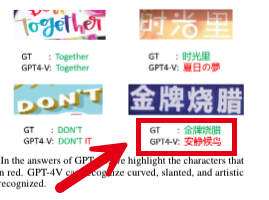
After partitioning, you can have a vision language model (VLM) optimize the fidelity of text blocks that Unstructured initially processed during its partitioning phase. Here are a few examples of Unstructured’s output of text blocks that were initially processed, and the more accurate version of these text blocks that were optimized by using Claude Sonnet 4. Irrelevant lines of output have been omitted here for brevity. Example 1: Vertical watermarked text Vertical watermarked text example Before (vertical watermarked text, represented incorrectly):
{
    "...": "...",
    "text": "3 2 0 2 t c O 9 2 ] V C . s c [ 2 v 9 0 8 6 1 . 0 1 3 2 : v i X r",
    "...": "..."
}
After (vertical watermarked text, now represented correctly from the original content):
{
    "...": "...",
    "text": "arXiv:2310.16809v2 [cs.CV] 29 Oct 2023",
    "...": "..."
}
Example 2: Hyperlink Hyperlinked text example Before (hyperlink, represented incorrectly):
{
    "...": "...",
    "text": "con/Yuliang-Liu/MultinodalOCR|",
    "...": "..."
}
After (hyperlink, now represented correctly from the original content):
{
    "...": "...",
    "text": "https://github.com/Yuliang-Liu/MultimodalOCR",
    "...": "..."
}
Example 3: Chinese characters Chinese characters example Before (Chinese characters, represented incorrectly):
{
    "...": "...",
    "text": "GT SHE GPT4-V: EHES",
    "...": "..."
}
After (Chinese characters, now represented correctly from the original content, expressed as Unicode):
{
    "...": "...",
    "text": "GT : \u91d1\u724c\u70e7\u814a GPT4-V: \u6587\u9759\u5019\u9e1f",
    "...": "..."
}

Improve text fidelity with generative OCR

To produce generative OCR optimizations, add a Generative OCR node to your workflow by clicking + in the workflow editor, and then click Enrich > Generative OCR. Be sure also to select one of the available provider (and model) combinations that are shown.
Generative OCR does not process any text blocks by default. You must also explicitly specify which document element types containing text that you want generative OCR to process. To do this, in the workflow editor for your workflow:
  1. Click the Partitioner node.
  2. In the node’s settings pane, scroll down to and then click a blank area inside of the Extract Image Block Types list.
  3. Select each document element type that you want generative OCR to process. For this walkthrough, select only NarrativeText.
Generative OCR does not process the text of any Image or Table elements if they have already been processed by image description or table description enrichments, respectively. Do not remove the Image or Table document elements types from this Extract Image Block Types list, or else the image description and table description enrichments in your workflow might produce unexpected results or might not work at all.
You can change a workflow’s generative OCR settings only through Custom workflow settings.For workflows that use chunking, the Chunker node should be placed after all enrichment nodes. Placing the Chunker node before an image descriptions enrichment node could cause incomplete or no image descriptions to be generated.
Unstructured can produce generative OCR optimizations for workflows that are configured as follows:
  • With a Partitioner node set to use the Auto or High Res partitioning strategy, and a generative OCR optimizations node is added.
  • With a Partitioner node set to use the VLM partitioning strategy. No generative OCR optimization node is needed (or allowed).
Unstructured never produces generative OCR optimizations for workflows with a Partitioner node set to use the Fast partitioning strategy.